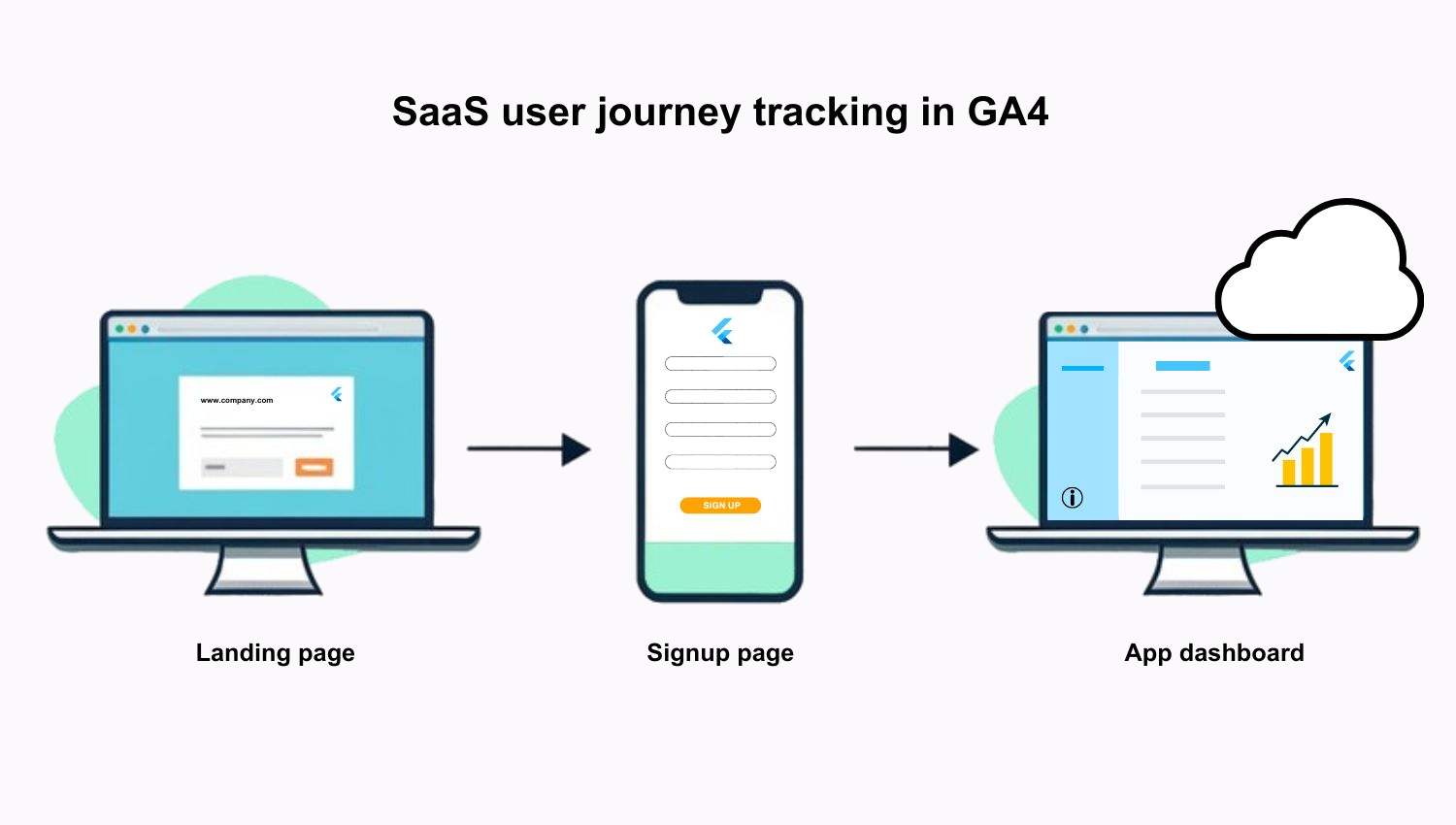
In B2B SaaS, the user journey isn’t always straightforward. People rarely land on your homepage, click “Start free trial,” and become loyal users in one go. Most of the time, they jump between your marketing site, a signup portal, and eventually your cloud-based app – all on different subdomains.
The problem? GA4 doesn’t automatically connect those dots. If someone moves across domains, it often treats each step as a separate session. You lose sight of where they came from, which pages they visited, and where they dropped off. Funnels break. Insights go missing. And trying to fix it without the right setup can get frustrating fast.
I ran into this exact challenge while working on the tracking for a B2B cloud-based SaaS platform. The registration happened on a subdomain. The app was hosted on another. And the main website – where most people started their journey – was separate too. To get a clear picture of how users found us, which pages they explored, and how far they got in the trial process, I had to connect everything through cross-domain tracking in GA4.
That’s what inspired this post.
I’ll walk you through how to track that full SaaS journey – website, portal, and app included – using custom funnels in GA4. By the end, you’ll be able to build a funnel that shows you not just who signs up but also what happens before and after they do.
Table of Contents
What custom funnels do in GA4
Let’s start with the basics. Funnels in GA4 help you visualize the steps users take toward a goal – like signing up for a trial or completing onboarding. But, unlike the old version of Google Analytics (Universal Analytics), GA4 funnels are built on events, not just pageviews or goal completions.
This means you can track almost anything, from a button click to a scroll or even a video play. You get full control over which steps to include and how those steps are defined.
What’s also nice? Funnels in GA4 are retroactive. So, even if you create a funnel today, you can apply it to past data – as long as those events are already being tracked. That’s a big win compared to the “set it and forget it” approach we were stuck with in the past.
You can also:
- Add breakdowns (like source/medium or device type)
- See drop-offs and conversion rates at every step
If you’re still used to the old-school funnel reports in Universal Analytics, here’s a quick look at how GA4 does things differently – and better.
GA4 vs. Universal Analytics: Funnel features compared
| Feature | GA4 custom funnels | UA funnels (free version) |
|---|---|---|
| Based on | Events (fully customizable) | Pageviews and goals |
| Retroactive? | Yes – works on past data | No – only tracks from setup date |
| Cross-domain support | Yes (with setup) | Tricky and often unreliable |
| Flexible step types | Any event: page_view, click, form submit, etc. | Limited to page URLs |
| Open or closed funnels | Both options available | Only closed funnels |
| Visual drop-off analysis | Yes, with filters and segment breakdowns | Basic and harder to customize |
| Breakdowns by audience, device, channel, etc. | Easy to apply | Limited and harder to segment |
In short, custom funnels let you zoom in on how people move through key stages of your site or app and where they bounce.
When it comes to cross-domain journeys, this becomes even more powerful. You’re no longer limited to just the marketing site – you can follow users across portals, platforms, and products.
A typical SaaS cross-domain user journey
Let’s break down what a cross-domain journey looks like in a real SaaS scenario.
Say someone discovers your tool through a LinkedIn ad or a Google search (organic search). They land on your marketing website – maybe check out a few product pages or the pricing page. Or maybe they land on a blog post first because they’re still researching and not ready to buy. In that case, they’re probably looking for high-level information, not signing up right away.
That’s why understanding user intent is so important. Not everyone who lands on your site has commercial intent from the start, especially if they come from organic search. But with the right funnel setup, you can still follow their journey as it evolves, even across domains.
Once they’re ready, they might click “Start free trial,” which takes them to a sign-up portal hosted on a different subdomain (or even a different platform altogether). After registering, they get redirected to the app, log in, and start using the product.
Simple for the user. A bit messy for GA4 unless you’ve set up cross-domain tracking.
Before setting this up myself, I actually sketched the full journey on paper. I find it’s the fastest way to get my thoughts in order – just a few quick boxes and arrows, and I can already see how the flow works. It’s way easier than jumping into GA4 or writing things out in a Word doc, especially when formatting gets in the way before I’ve even mapped the basics.
Here’s how this kind of journey usually plays out:
| Step | Domain | Event |
|---|---|---|
| 1. Land on website | www.company.com | page_view |
| 2. Explore product/pricing pages | www.company.com | page_view, scroll, cta_click |
| 3. Click “Start free trial” | www.company.com → signup.company.com | cta_click |
| 4. Complete registration | signup.company.com | sign_up |
| 5. Redirect to app | app.company.com | page_view, login |
| 6. Begin onboarding or use key feature | app.company.com | onboarding_start, feature_use |
Each of these steps matters, especially in a B2B context, where decisions take longer and trial activation is key. And, the more clearly you can see this journey, the better you can optimize your content, CTAs, and onboarding experience.
Why GA4 sessions break across domains (and how to fix it)
So, here’s the issue: GA4 doesn’t automatically know your domains are connected. If a user moves from your main website to a different subdomain – like a sign-up portal or app – GA4 often starts a brand-new session.
This breaks the user journey.
It’s not a bug. It’s just how cookies work. GA4 uses first-party cookies that are tied to the domain. So when a user clicks from www.company.com to signup.company.com, GA4 treats that like a brand-new visitor unless you specifically tell it otherwise.
The result? You lose:
- The source/medium data (so you can’t see where users originally came from)
- Conversion paths and funnels get disconnected
- Reports show self-referrals from your own domains (which makes no sense).
This is especially painful in B2B SaaS, where it’s common to use different platforms or environments for signup, onboarding, and the product itself.
The fix: cross-domain tracking
To make GA4 recognize the same user across different domains, you need to:
- Link your domains using cross-domain tagging
- Exclude your own domains from showing up as referral traffic.
This way, GA4 can pass a special identifier between domains that keeps the session intact. It doesn’t matter if the user moves between three different subdomains – you’ll still see one continuous journey with the correct traffic source and event flow.
It takes a few steps to set up, but once it’s working, you’ll get a much clearer picture of what your users are actually doing.
Build the custom funnel in GA4
Once your cross-domain tracking is working, it’s time to build a funnel that actually shows how users move from visiting your website to signing up and logging into your SaaS app.
GA4 makes this pretty flexible. You’ll do this in the Explorations section.
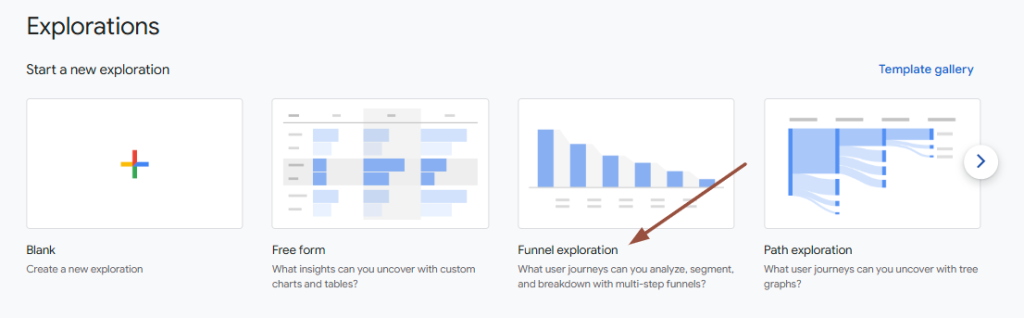
Step 1: Go to Explorations
- In your GA4 property, click Explore (left sidebar)
- Choose Funnel exploration
- Click + Create a new exploration
This opens a blank canvas where you’ll define your funnel steps based on the events you’re already tracking.
Step 2: Define your funnel steps
Here’s an example funnel for a B2B SaaS product:
| Step | Event | Condition |
|---|---|---|
| 1. Website visit | page_view AND hostname | page_location contains /product-x/ or /pricing/ AND = www.company.com |
| 2. CTA click | cta_click | event_name = cta_click OR button_name = ‘start free trial’ |
| 3. Sign-up page load | page_view | page_location contains /registration/ |
| 4. Registration completed | event_name | = sign_up_completed |
| 5. App login | page_view | page_location contains /dashboard/ |
| 6. Onboarding completed | event_name OR page_view | = onboarding_complete OR page_location contains /new-document/ |
You can add or remove steps depending on what your SaaS journey looks like. Just make sure all the events are tracked consistently across domains.
Step 3: Adjust funnel settings
In the funnel builder (right side panel), you can choose:
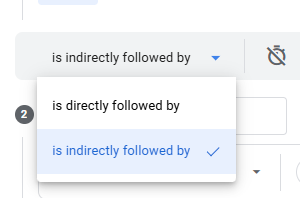
- Is indirectly vs directly followed – Define if each step in the funnel is directly or indirectly followed by the next step.
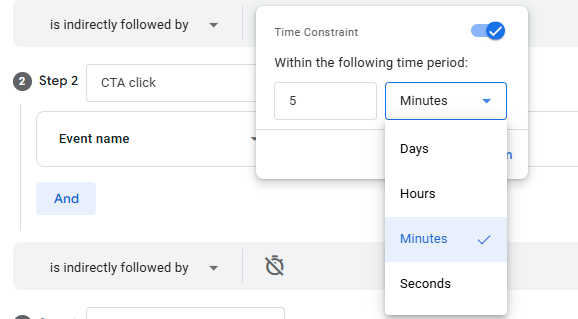
- Time constraint → Define how long users have to move from one step to the next (e.g., 5 minutes from first step)
- Breakdowns → Segment the funnel by device, country, source/medium, or any custom dimension (e.g., user industry)
If you’re using User ID, GA4 will track user progress even if they complete steps in different sessions or on different devices.
Step 4: Analyze and interpret results
Once your funnel loads, you’ll see:
- Completion rates between steps
- Where users drop off
- Total conversions
- Elapsed time (if enabled under ‘Settings’)
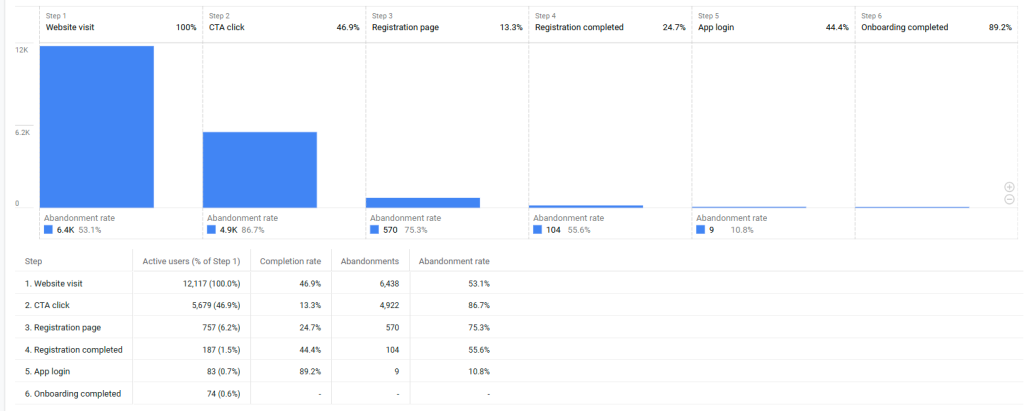
This is where you start seeing real value. You’ll be able to answer questions like:
- How many people who visit the product or pricing page actually start a trial?
- Do most drop-offs happen before or after the sign-up form?
- Are mobile users converting at the same rate as desktop users?
What insights can you get?
Once your funnel is up and running, you’ll be able to:
- Measure how many users drop off between clicking the CTA and submitting the form
- Compare trial completion rates by traffic source (e.g., organic search vs. paid)
- Spot UX issues in the signup flow (e.g., low conversions on mobile devices)
- See whether users who explore specific product pages are more likely to activate
For example, you might discover that users landing on your /product-x page convert much better than those coming from a general feature overview. That could tell you your product-specific messaging resonates more – or that the CTA is better placed.
This kind of insight goes beyond surface-level metrics. It helps you understand not just what users do but why they drop off and where you can make the experience smoother.
Testing and troubleshooting your cross-domain funnel
Before you start making decisions based on your GA4 funnel, it’s important to make sure everything is tracking correctly. Even with the right setup, things can go wrong – sessions might still break, events might not fire, or traffic sources could get lost.
How to test your cross-domain setup
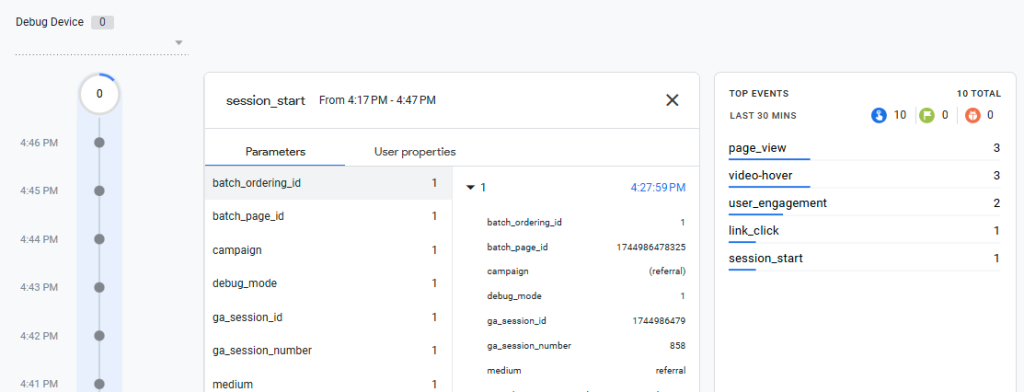
Go to your GA4 property → Admin → Data display → DebugView. This lets you see real-time events as you trigger them.
- Click through your actual funnel
In an incognito browser tab, start on your main website, click the CTA, go through the signup flow, and land in your app. Make sure:
- You see one continuous session
- The traffic source (e.g., referral) stays the same
- Events like cta_click, sign_up, and login appear in order
- Use Google Tag Assistant (legacy) or the GA4 Chrome extension
These tools help confirm that the linker is working and that the Measurement ID is correctly loaded across domains.
🛠️ Common issues and how to fix them

If you catch something that doesn’t make sense, don’t panic. Most issues come down to:
- A small config error in your GTM or gtag.js tag
- A domain missing from the linker list
- An event that isn’t tracking as expected
Once everything works, your funnel should feel like a story that makes sense- from first touch to onboarding.
Bonus tips for better SaaS funnel insights
Once your funnel is set up and tracking correctly, don’t stop there. GA4 gives you room to dig deeper and tailor your analysis to your actual goals, especially if you’re focused on improving trial activation or onboarding in a SaaS product.
Here are a few extra tips to level up your insights:
1. Track trial start and trial activation separately
Not every user who signs up will actually start using your product.
- Use a trial_started event when the user first logs in or lands on the dashboard.
- Use a feature_used or project_created event to track true product engagement.
This helps you separate curious users from those who are actively testing your tool.
2. Add user properties or custom dimensions
If you’re capturing data like company size, industry, or plan type during signup, use those as custom dimensions or user properties.
You’ll be able to slice your funnel by:
- Business type (e.g., startups vs. enterprise)
- Location or language
- Acquisition channel + company profile
This can help your product and marketing teams prioritize what’s working for your ideal customers.
3. Build a Looker Studio dashboard
Explorations are great but not always the easiest to share or track over time.
Create a Looker Studio report (formerly Data Studio) that visualizes:
- Funnel conversion rates
- Drop-off points
- Time to conversion
- Conversions by source/medium
Use filters or tabs to show different audiences or product areas side by side.
4. Link GA4 to BigQuery (if you want advanced funnel analysis)
If you’re ready to dive deeper, export your GA4 data to BigQuery. This gives you:
- Full access to raw event data
- The ability to write custom SQL queries
- More flexibility for building cohort-based funnels (e.g., how behavior changes after 7 days)
This is especially useful if your app is built around complex user behavior or long sales cycles.
5. Keep your funnel events clean and consistent
One last tip: make sure your events are firing the same way across all domains and environments.
- Use clear naming conventions (sign_up, cta_click, onboarding_complete)
- Avoid duplicating events or mixing event names with different meanings
- Test regularly after product updates.
This will save you time later when you want to update or expand your funnel.
Final thoughts
Cross-domain funnels in GA4 aren’t just a “nice to have” for SaaS – they’re essential if you want to understand how users move from interest to action across your website, signup portal, and app.
Once you set it up, you’ll stop guessing where people drop off and start seeing the full journey – from product discovery to onboarding.
It takes a bit of effort to get it right, but the clarity you’ll gain is totally worth it.