Bounce rate is key to creating an engaging website that resonates with visitors. And while a high bounce rate might seem alarming, it’s important to dig deeper to understand what it really means for your website and how it aligns with your goals.
In the following sections, I’ll cover the ins and outs of bounce rate, how to measure it effectively, and some actionable steps to improve it. By the end, you’ll have a clearer picture of how to make your site more engaging and more appealing to search engines.
Table of Contents
What is a bounce rate?
A bounce rate is the percentage (%) of visitors who land on a page of your website and leave without visiting any other pages. For example, if 100 people visit your homepage and 60 leave without exploring further, your homepage’s bounce rate would be 60%.
Bounce rate is a key metric because it can reveal how well your content engages users, how intuitive your navigation is, and whether your website meets users’ expectations. When visitors leave quickly, it often signals that they didn’t find what they were looking for or that something prevented them from engaging further. This can impact your brand’s credibility and its search engine performance.
Why bounce rate should matter to you
Understanding and optimizing bounce rate isn’t just about numbers – it’s about creating a better experience for your website visitors. High bounce rates can sometimes indicate serious issues, such as:
- unclear content or poor page design;
- slow loading times, especially on mobile;
- mismatched user expectations or search intent.
When you improve your bounce rate, you often also improve the user experience and align your content more closely with what users search for. Lowering your bounce rate can also indirectly boost your SEO, as search engines may see users spending more time on your website as a signal of relevance and quality.
How to measure your website’s bounce rate
Using Google Analytics 4
Google Analytics 4 (GA4) is the most widely used tool for tracking bounce rates, and it provides a straightforward way to find this data.
#1. Accessing bounce rate data:
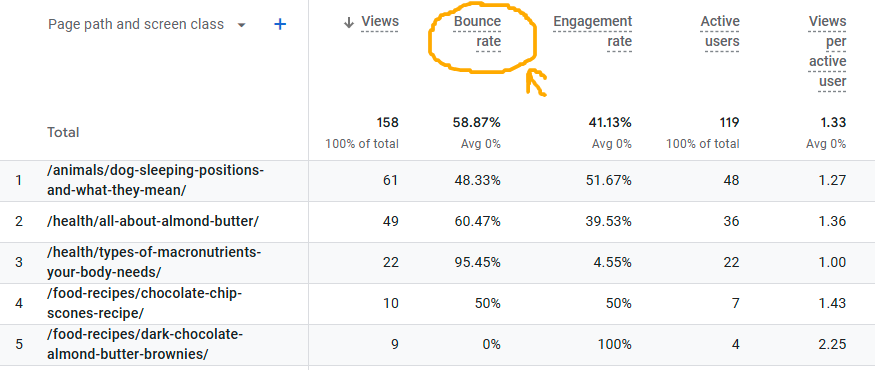
Log in to Google Analytics 4 and go to Reports > Engagement > Pages and Screens. This report displays bounce rates by page, helping you identify which pages might need attention. If the metric isn’t visible in the report, click the small pen icon in the top right corner. Next, navigate to Reports data > Metrics > Add metric.
#2. Understanding site-wide vs. page-specific bounce rates:
Site-wide bounce rate gives a high-level view of how your entire site performs in terms of engagement. On the other hand, page-specific bounce rates can highlight which pages may have issues or need improvement, as well as identify high-performing pages where visitors are deeply engaged.
#3. Setting date ranges and comparing periods:
In GA4, you can set specific date ranges or compare data over different time periods. This helps track bounce rate trends over time and assess the impact of recent changes to your website, like new content or design adjustments.
Other tools to measure bounce rate
While GA4 is the most popular tool for measuring bounce rate, other analytics platforms offer additional insights or specialized metrics:
- Adobe Analytics – A powerful tool that provides in-depth bounce rate data and offers customization options for businesses with specific analytical needs.
- Matomo (formerly Piwik) – An open-source, privacy-friendly alternative to Google Analytics. Matomo provides bounce rate insights along with solid data ownership and compliance features.
- SEMrush and Ahrefs – Primarily SEO tools, these two platforms also include site performance metrics that can help track bounce rates in the context of organic search performance.
Different tools, different calculations
It’s worth mentioning that different analytics platforms may calculate bounce rates slightly differently. For example, while Google Analytics 4 considers a single-page session with no further interaction a “bounce,” other tools may have varied definitions based on how they track engagement.
So, when comparing bounce rates across platforms, remember these differences. For the most accurate insights, choose one primary tool and stick with it to measure progress over time.
What constitutes a “good” bounce rate?
Benchmarking by industry
Bounce rate standards vary widely depending on the type of website and the industry it serves. For example, a content-heavy blog may naturally have a higher bounce rate than an eCommerce site because visitors might only need to read a single article before leaving.
Here are some general bounce rate benchmarks by industry:
- Blogs and content websites: 70%–90%
- Retail and eCommerce websites: 20%–45%
- Service-based websites: 10%–30%
- Landing pages: 70%–90%
- B2B websites: 25%–55%
If your bounce rate falls within the typical range for your industry, you’re likely on the right track. However, a higher-than-average bounce rate could indicate areas for improvement, especially if your competitors in the same niche show better performance.
Different pages, different expectations
Even within a single website, bounce rates can vary significantly by page type. Here’s why:
- Homepages – As entry points, homepages often experience lower bounce rates since they typically direct users to other pages through clear navigation links.
- Blog posts – Articles and blog posts can have high bounce rates, especially if users find the specific information they need and leave afterward. This isn’t always a bad sign – it could mean the content is highly relevant.
- Product pages – For eCommerce sites, product pages should ideally have a lower bounce rate, indicating that users are exploring other products or moving towards making a purchase.
- Landing pages – A high bounce rate is expected, especially if the page has a single, focused CTA like “download now.” Here, a high bounce rate can still be positive if visitors complete the intended action.
Balancing bounce rate with user intent
Bounce rate isn’t one-size-fits-all, so understanding user intent is essential when evaluating this metric. For example, if your content answers a user’s question directly, they might leave after a single page view – and that’s okay. If visitors spend significant time on the page before bouncing, it could mean they found your content helpful.
However, a high bounce rate on critical pages (like your homepage or a product page) might be worth examining further. For example:
- Are users struggling with navigation?
- Is the page load time slow?
- Is the design user-friendly?
- Are there any technical issues?
- Are the visuals and multimedia compelling?
- Are there any on-page distractions, such as pop-ups and ads?
- What does user behavior data reveal? (Hint: use heatmaps to get insights into user interactions.)
Identifying and addressing website issues can often improve bounce rates and lead to better engagement metrics overall.
Setting realistic bounce rate goals
Ultimately, setting a “good” bounce rate goal depends on your website’s purpose, target audience, and content. For most websites, the goal isn’t necessarily to achieve the lowest possible bounce rate but rather to maintain a rate that aligns with user intent and encourages meaningful engagement.
Thus, start by benchmarking your bounce rate against industry standards, then set a realistic improvement target that aligns with your website’s unique goals.
Common reasons for a high bounce rate
A high bounce rate can be frustrating, especially when working hard to drive traffic to your website. While some level of bounce is natural, a persistently high bounce rate often signals issues that impact user experience or page relevance. So, let’s look at some common reasons for high bounce rates and what they might mean for your website.
1. Poor page design and User Experience (UX)
Visitors are likelier to leave if a page is cluttered, hard to navigate, or visually unappealing. Factors like an overload of text, lack of clear navigation, or distracting elements (e.g., excessive ads) can make a page feel overwhelming. To keep users engaged, you should focus on a clean, intuitive design to help visitors quickly find what they want.
2. Mismatched content and search intent
If visitors arrive on your website expecting one thing but find something else, they’re likely to bounce. This mismatch can happen when:
- The page content doesn’t match the keywords or ads that brought users there.
- Headlines or meta descriptions set up expectations that the page content doesn’t fulfill.
Optimizing for search intent – whether it’s informational, transactional, or navigational – helps ensure that users find relevant content, keeping them on your website longer.
3. Slow page load speed
Today’s users expect quick access to information, and even a few extra seconds of load time can lead to a high bounce rate. Research shows that bounce rates increase sharply with each second a page takes to load. Factors contributing to slow speed include:
- large image files or videos that haven’t been optimized;
- excessive use of JavaScript or other heavy code;
- lack of browser caching or Content Delivery Network (CDN) support.
Consider using tools like Google PageSpeed Insights to identify and fix issues slowing down your page.
4. Intrusive pop-ups or ads
While effective for lead generation, pop-ups can also disrupt the user experience if overused or poorly timed. Intrusive ads or pop-ups that appear immediately upon page load can frustrate visitors, leading to a quick exit. To avoid this, consider:
- timing pop-ups to appear after users have had time to engage with your content;
- limiting the number of pop-ups or ads on each page;
- making it easy for users to close pop-ups.
5. Lack of mobile optimization
With more users accessing websites on mobile devices, a lack of mobile optimization can significantly affect the bounce rate. Visitors may leave immediately if a page doesn’t load correctly, requires excessive scrolling or zooming, or feels clunky on mobile. Thus, ensure your website is fully responsive, and that text, images, and buttons display well across all screen sizes.
6. Weak CTAs or no next step
Without a clear call-to-action, visitors may feel unsure about what to do next, which can lead to bounces. Weak or confusing CTAs fail to guide users further into your website. Effective CTAs are:
- clear and specific about the next step (e.g., “learn more,” “download the guide”);
- placed strategically to guide users naturally through the page;
- aligned with user intent so that visitors feel their next step is valuable.
7. Technical errors and broken links
Technical issues like 404 errors, broken links, or page layout problems can frustrate visitors and lead to bounces. Thus, you should regularly audit your website to identify and fix these errors to ensure users have a smooth experience and can access the content they came for.
Methods to improve bounce rate
Reducing bounce rate involves optimizing your website for user experience, relevance, and performance. Here are several practical steps to keep visitors engaged and nudge them to explore more of your website.

Optimize for user experience (UX)
A clean, easy-to-navigate website encourages visitors to stay longer. Consider these UX improvements:
- Keep your design uncluttered and focus on readability. Use clear headings, bullet points, and white space to make content scannable;
- Make it easy for users to find important pages with clear navigation menus and internal links;
- Avoid intrusive ads or pop-ups that can disrupt the user experience. Instead, opt for non-intrusive banners or exit-intent pop-ups to reduce the bounce rate without annoying visitors.
Improve page load speed
Page speed is a crucial factor in keeping users engaged. Faster-loading web pages lead to lower bounce rates and better user satisfaction. Here are some ways to boost load speed:
- Compress large images using tools like TinyPNG or JPEG Optimizer to reduce file size without sacrificing quality;
- Enable browser caching and use a CDN. Caching reduces the load on your server, while a CDN helps serve content faster by using servers close to the visitor’s location;
- Limit heavy scripts (e.g., JS code) or third-party plugins that can slow down your website and remove unnecessary code.
Using a tool like Google PageSpeed Insights can help you identify specific areas for improvement.
Align content with user intent
Visitors often leave a page if the content doesn’t meet their expectations. Thus, aligning content with user intent can encourage them to stay and explore. Here’s what you could do:
- Optimize your pages based on the user’s search intent;
- Make sure content answers the user’s questions or solves their problems quickly and clearly;
- Ensure that your SEO title tags, meta descriptions, and main headings accurately reflect the page content so visitors know exactly what to expect.
Enhance mobile experience
With mobile traffic making up a large portion of website visits, ensuring mobile-friendliness is essential. Here’s how to optimize your website for mobile users:
- Use a mobile-responsive design that can adapt to different screen sizes and devices;
- Flash and overly large images can slow mobile load times, so keep visuals lightweight and optimized;
- Make buttons, links, and menus easy to tap and navigate on mobile.
Effective internal linking
Encourage visitors to explore more pages by adding relevant internal links within your content – for instance:
- Insert links to related product pages, blog posts, or guides that might interest users;
- Use clear CTAs that prompt users to visit other sections of your website. Phrases like “Read Next,” “Discover More,” or “See Our Services” can gently guide users to explore further;
- Arrange links naturally within the content, enhancing the user journey and keeping users engaged with helpful resources.
Add engaging elements like videos and interactive content
Adding multimedia or interactive elements can keep users engaged and reduce bounce rate – for example:
- Videos can increase engagement, especially when short, relevant, and informative. For example, product demos, “how-to” tutorials, or customer testimonials;
- Infographics simplify complex information visually;
- Interactive quizzes or calculators encourage users to stay and engage more deeply.
While multimedia is effective, avoid excessive use that can slow down your webpage. And, make sure videos and images are optimized for fast loading.
Refine CTAs
Effective CTAs help guide users toward a specific next step, reducing their likelihood of leaving. Here’s how to make your CTAs work:
- Use clear and action-oriented language like “get started,” “learn more,” or “download now.”
- Place CTAs in easy-to-find locations, like at the end of articles or in prominent spots on the page.
- Tailor CTAs to fit the content and intent of the page. For example, a blog post might link to related articles or a downloadable resource, while a product page CTA could prompt users to view more product details or make a purchase.
How bounce rate fits into SEO
Bounce rate is important in SEO, though it’s not a direct ranking factor. Instead, it serves as a proxy for user experience and engagement, two areas that search engines consider when evaluating website quality. A high bounce rate can signal to search engines that visitors may not be finding value in your website, which could impact your visibility in search results.
Let’s see how bounce rate connects to SEO and discuss some ways to manage it effectively.
User engagement and behavioral signals
Search engines, like Google, use behavioral signals such as dwell time (i.e., how long a user stays on a page) and click-through rate to assess a page’s relevance. A high bounce rate, especially when coupled with low dwell time, may indicate that a page isn’t satisfying user intent. When users leave quickly, search engines may interpret this as a lack of relevance, potentially affecting your rankings over time.
Thus, focus on reducing bounce rate by improving engagement and dwell time.
Search intent and content relevance
Search intent – the reason behind a user’s search – matters heavily for SEO. If visitors bounce because your content doesn’t match their intent, search engines may reduce the page’s ranking for relevant keywords. To align your bounce rate with SEO goals, prioritize content that directly meets user expectations. For instance:
- For informational queries, provide clear, in-depth answers or guides that satisfy the query.
- Address navigational queries by ensuring users can find related links or products easily, as they may want to continue exploring.
- For transactional queries, make it easy for users to move toward a purchase or further research with relevant CTAs and product links.
Mobile optimization for improved rankings
With mobile traffic on the rise, a high mobile bounce rate can negatively affect your SEO. Pages that aren’t mobile-friendly may see lower rankings because users are less likely to engage with pages that don’t load well on their devices.
To optimize for mobile SEO and reduce bounce rate:
- Ensure your website is responsive and all page elements work well on mobile devices.
- Use structured data and streamlined navigation so mobile users can quickly find what they need.
Site speed as an SEO and bounce rate factor
Page speed is both an SEO ranking factor and a primary driver of bounce rate. Google considers fast-loading pages to be more user-friendly, which can lead to higher rankings. A slow page load time, on the other hand, frustrates users and signals to search engines that the page may not provide a good experience.
Use tools like Google PageSpeed Insights to evaluate and improve load times.
Internal linking for SEO and engagement
Internal linking is a dual-purpose strategy that aids both SEO and bounce rate. When you provide internal links to related content, you’re:
- Boosting SEO because internal links help search engines understand your website structure and distribute page authority.
- Reducing bounce rate because you guide users to other relevant pages on your website and keep them engaged longer.
High-quality content as a solution to bounce rate and a boost for SEO
Creating high-quality, engaging content is one of the best ways to reduce bounce rates and improve SEO. Search engines reward content that matches user intent, provides value, and keeps readers engaged. High-quality content can also encourage visitors to explore more pages, consequently reducing bounce rate and increasing average session duration.
Here are a few ways to enhance your content quality for better SEO and lower bounce rates:
- Regularly update your content with fresh information to attract return visitors and improve search rankings.
- Use relevant images, videos, and infographics to increase user engagement and help keep bounce rates low.
- Add strategic internal links to encourage users to explore related content.
Analyzing bounce rate alongside other SEO metrics
While bounce rate provides insights into engagement, it’s most valuable when analyzed alongside other SEO metrics, such as:
- Pages per session – it shows how many pages users visit per session, giving insight into how well your website encourages exploration.
- Average session duration – it measures the time users spend on your site, which, when combined with a low bounce rate, can indicate high engagement.
- Conversion rate – tracking bounce rates on high-converting pages can reveal which pages contribute most to your website’s success.
A balanced approach to analyzing these metrics helps you make informed decisions about SEO improvements.
In conclusion
Bounce rate is more than just a percentage – it’s a valuable signal that offers insights into how users interact with your website. By analyzing your website’s bounce rate and implementing strategies to reduce it, you’re improving user experience and boosting your SEO efforts. Optimizing elements like page speed, mobile responsiveness, content relevance, and UX design can significantly lower bounce rates and help retain users.
Remember, the goal isn’t always to reach the lowest possible bounce rate. Instead, aim for a bounce rate that aligns with user intent and industry benchmarks, ensuring visitors find value and are encouraged to explore.