Mastering the art of crafting SEO title tags is not just a skill; it’s a crucial element for enhancing your website’s visibility and attracting more visitors. A well-crafted SEO title tag can significantly improve your search engine rankings and, more importantly, entice users to click through to your content.
In this blog post, I’ll look into the fundamentals of SEO title tags, providing practical tips, examples, and a checklist to ensure your titles are optimized for maximum impact. Whether you’re new to SEO or looking to refine your strategy, understanding how to create compelling title tags will set your website apart in search results.
Table of Contents
SEO title tag basics
Creating an effective SEO title tag starts with understanding the HTML structure of a web page. The title tag resides within the element in the < head > section of the HTML document. This tag is crucial for both search engines and web users, as it provides a brief description of the page content. First, ensure your title tag is correctly placed within the < head > section and adheres to HTML syntax rules. Avoid common mistakes like missing closing tags (< / >), using incorrect attribute values (e.g., < title attribute=”value” > Page title < / title >), and placing the title tag outside the section. These errors can cause rendering issues and negatively affect your page’s indexing and ranking.
It’s important to make your SEO title tag informative and engaging. A well-crafted title tag can significantly improve your CTR from search engine results pages (SERPs). Think of the title tag as the first impression of your page. It should entice users to click through to your content by being clear, relevant, and compelling.
Moreover, consider the length of your title tag. Aim for between 30 and 60 characters to ensure it displays properly on SERPs. Titles longer than 60 characters might get cut off, which can reduce their impact and effectiveness.
How to structure your HTML file
Here’s an example of how you can structure your HTML file with the provided SEO elements:
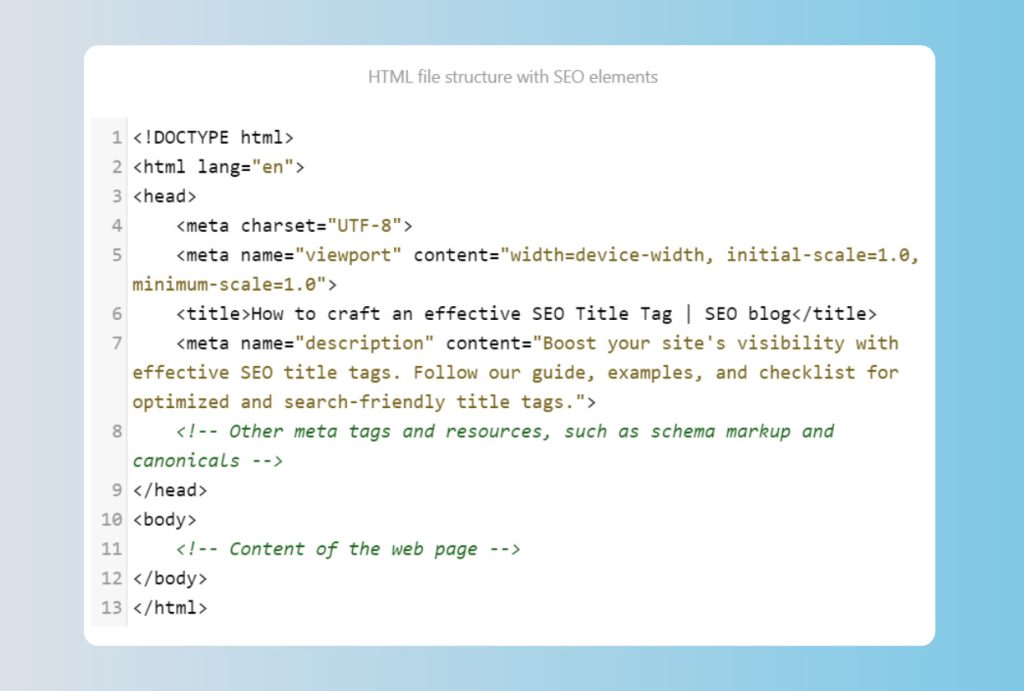
In this example:
- The < !DOCTYPE HTML > declaration specifies the HTML5 document type.
- The < html lang=”en” > tag is crucial for international SEO as it sets the document’s language to English, making it more accessible to a broader audience.
- < head > contains metadata about the document, including character set (< meta charset=”UTF-8″ >), viewport settings for responsive design (< meta name=”viewport” content=”width=device-width, initial-scale=1.0, minimum-scale=1.0″ >), and the < title > element for the page title.
- < title > specifies the web page’s title, which is displayed in the browser tab or window.
- < meta name=”description” > concisely summarizes the page content for search engines and social media sharing.
- Additional meta tags and resources specific to your needs, such as schema markup or canonical URLs, can be included within the < head > section.
- The < body > section is where you would place the main content of your web page.
Lastly, it’s crucial to replace the placeholder content (< !– Content of the web page — >) with your actual web page content. This structure is a cornerstone of SEO best practices, as it provides clear, relevant metadata that enhances search engine visibility and user engagement.
Effective vs. ineffective title tags
Now, let’s look at some examples to illustrate the difference between effective and ineffective title tags.
Page URL: https://example.com/healthy-recipes/
Bad example: Recipes | Example – Too brief and general. It fails to convey the page’s specific content.
Good example: Healthy Recipes for Quick Meals | Example – Contains the target keyword, appropriate length, and clearly describes the page content.
Page URL: https://example.com/digital-marketing-tips/
Bad example: Digital Marketing | Example – Too broad and generic. It does not give specific information about the page’s content.
Good example: Top 10 Digital Marketing Tips for 2024 | Example – Begins with the target keyword, has an appropriate length, and offers a clear insight into what the page contains.
Your checklist for optimizing SEO title tags

- Length
Keep the title tag between 30 and 60 characters. Longer titles may be truncated.
- Keyword research
Do keyword research to find relevant search terms. Also, review your page content or analyze competitors’ title tags for ideas.
- Relevance
Include the target keyword and ensure it reflects the page content. Avoid keywords with zero search volume.
- Natural language
Avoid keyword stuffing. Your SEO title tag should read naturally.
- Consistency
Ensure the title tag, meta description, and page content align to provide a cohesive user experience.
- Specificity
Use specific, not overly broad, title tags for effective ranking.
- Uniqueness
Each website page should have a unique title tag. Duplicate titles can confuse search engines.
- Branding
Include your brand name, especially for the homepage and key landing pages. This improves brand recognition.
- Placement
Place the brand name at the end of the SEO title tag unless branding is more important than keywords.
- Keyword position
Position your target keyword at the beginning of the title tag when possible.
- Capitalization
Choose a capitalization style (e.g., capitalize the first letter of each word) and be consistent.
- Adverbs
Minimize the use of adverbs unless essential for meaning.
- Intent alignment
Align your target keyword with the page’s purpose (e.g., use commercial keywords for product pages).
- Vertical bar
Use the vertical bar sign (|) to separate elements within your SEO title tag for better readability.
- Stop words
Avoid using stop words like “and,” “but,” or “or” unless necessary for clarity.
- Action-oriented language
Use action words to encourage clicks (e.g., “Discover,” “Learn”).
- Numbers and data
When relevant, include numbers or specific data to attract attention.
- Testing
Test different title tag variations to see which performs best in terms of CTRs and ranking.
- Location keywords
Include location-specific keywords if targeting a specific area.
- Emotional triggers
Use persuasive language or emotional triggers to appeal to your audience (e.g., “Transform your fitness journey today | Ultimate workout plans”).
In conclusion
By following these instructions, you can create effective, SEO-friendly title tags that improve your ranking on search engines (e.g., Google, Yandex, and Bing) and attract more visitors to your website. Remember, the title tag is your first opportunity to make a good impression on both users and search engines. Take the time to craft it carefully, ensuring it is relevant, specific, and engaging. This will help your website stand out and perform better in search results.