Generative Engine Optimization (GEO) is an exciting frontier in digital marketing. With AI tools like ChatGPT, Gemini, and other conversational engines becoming key players in online search, crafting GEO-friendly content ensures your material is visible and useful in this evolving space. If you’re new to GEO, don’t worry. This guide explains what GEO is and provides a step-by-step plan for creating GEO-optimized content that works.
Table of Contents
What is GEO?
GEO, or Generative Engine Optimization, involves creating content designed for AI-driven search engines. Unlike traditional SEO, which focuses on ranking web pages in Google, GEO ensures your content is easily understood and processed by AI tools that deliver direct, conversational answers to users.
For example, if someone asks, “How do I attract local customers to my café?” AI systems generate a conversational response by analyzing clear, relevant, and well-structured content. GEO ensures your content is featured in such answers.
Why GEO matters
Generative engines don’t just link to websites – they summarize and reframe content to provide instant responses. Without GEO, these systems may not accurately pick up or present your content. Key benefits of GEO include:
- visibility in AI-driven search results,
- improved relevance for conversational queries,
- increased engagement as users trust AI-generated recommendations.
Step-by-step process of creating GEO-friendly content
Step 1: Understand your audience
As with traditional SEO, GEO starts with understanding your audience. Tailor your content to their specific needs and questions. Generative engines rely on clarity and relevance, so the better you address audience queries, the better your content will perform.
For example, imagine you’re creating content for small business owners exploring local SEO. Their common questions might include:
- “How do I rank higher in local searches?”
- “What keywords should I use to attract local customers?”
- “How do I optimize my Google My Business profile?”
Your content should directly answer these questions in an engaging and straightforward way.
Step 2: Research queries and keywords
Generative engines prioritize natural language. Instead of focusing solely on keywords, target conversational queries, i.e., questions users would ask AI. Use tools like SEMrush, Google’s “People Also Ask” (PPA) box, or ChatGPT to find relevant queries.
For example, if you want to use SEMrush for your GEO query research, here’s what you should do:
- Go to SEMrush and navigate to the Keyword Magic Tool.
- Input broad topics like “local SEO” or “optimize Google My Business.”
- Filter results by question format (e.g., queries starting with “how,” “why,” or “what”).
- Look for high-intent, conversational phrases such as:
- “How do I optimize for local SEO?”
- “What are the best tools for local SEO?”
- “How can I rank higher in my city?”
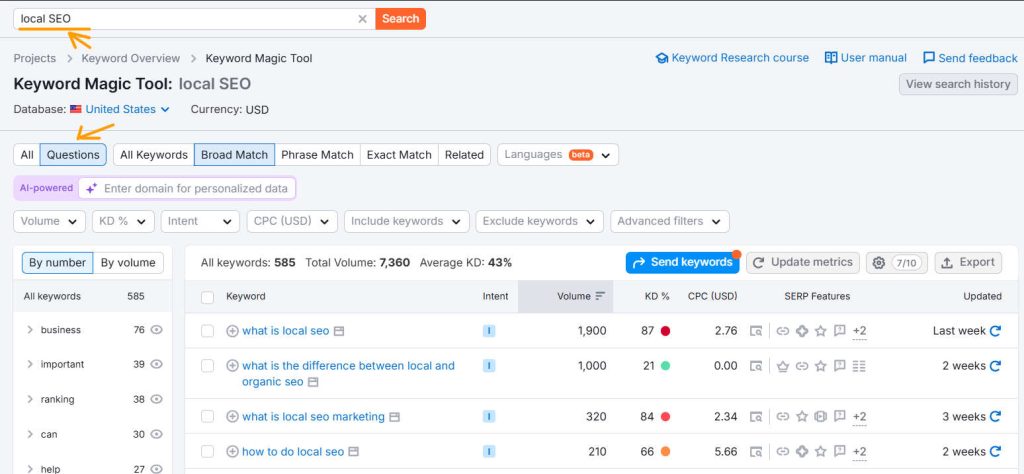
Compile these queries into a list to structure your content around.
Step 3: Structure your content clearly
Generative AI prefers content that is concise and easy to digest. So, use clear headings, subheadings, and bulleted or numbered lists. This structure helps AI understand your content and relay it effectively.
Follow these tips:
- Use clear headings and subheadings – break your content into logical sections with headings that reflect common questions. For example, use headings like “What is local SEO?” or “How to optimize content for local SEO” for topics users might search for.
- Add FAQ sections – create an FAQ section to answer specific questions directly. This format aligns with how AI generates responses. For example, the question is, “How can I optimize my business for local SEO?” the answer is, “Start by claiming your Google My Business profile, ensuring all details are accurate. Include high-quality photos, encourage reviews, and update your profile with offers or events. These steps can make your business more visible in local search results.”
- Include lists and tables – generative engines like summarized data in lists or tables. These formats are easy for AI to parse. For example, create a table showing “Key factors for local SEO” (see example below).
| Factor | Importance | Tips to optimize |
|---|---|---|
| Google My Business | High | Complete all details and post updates |
| Local keywords | High | Use phrases like “best café in Austin” |
| Customer reviews | High | Request reviews and respond promptly |
| Mobile-friendly website | Medium | Optimize for speed and usability on mobile |
Example of a list → Steps to improve local SEO for small businesses:
- Claim and optimize your Google My Business profile.
- Use local keywords in your website content and metadata.
- Encourage and respond to customer reviews.
- Build local backlinks by partnering with nearby businesses.
- Ensure your website is mobile-friendly.
Step 4: Craft clear, conversational content
Generative engines work best when the content is clear. Write like you’re having a conversation with your audience. Keep sentences simple, answer questions directly, and offer value before going into the details.
With voice searches now making up 50% of daily searches worldwide (and that number is growing), people need information that’s easier to understand and more straightforward.
To create more conversational content, follow these tips:
- Answer the questions people are asking.
- Use long-tail keywords, like “How do I optimize my website for local SEO?” instead of just “local SEO.”
- Include a summary at the top of the page.
- Define any uncommon terms clearly in your content when needed.
For example, for the query, “What is the best way to optimize Google My Business?” write, “Start by claiming your profile on Google My Business. Then, complete all sections, including your business name, address, phone number, and operating hours. Use high-quality images, encourage customer reviews, and regularly update your profile with posts and offers.” Follow up with examples or tips to add depth.
Tip: Remember that writing for AI search engines differs from writing for SEO. In SEO, longer content is preferred. But AI search engines look for short, clear answers to give users. So, short content that covers specific topics has the best chance of ranking well.
Step 5: Add depth with examples and context
Generative AI engines prefer content that goes beyond surface-level answers. Include examples, analogies, or case studies to give users (and AI) a richer experience.
Example: How reviews impact local SEO
Instead of saying, “Reviews improve local SEO,” explain why and how: “Encouraging customer reviews on Google My Business can significantly boost your local ranking. For example, a local pizzeria in Chicago saw a 25% increase in local traffic after asking customers to leave reviews. Responding to both positive and negative feedback also improves trust and engagement.”
Adding real-world examples makes your content relatable and valuable.
Step 6: Use visual aids
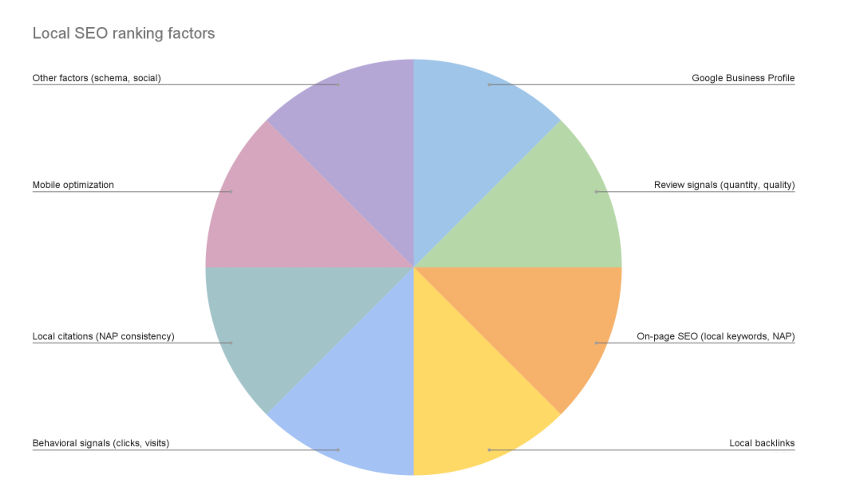
Visual aids like charts, checklists, and infographics make your content more engaging and AI-friendly. Generative tools often extract these elements to summarize information visually. Here are some visual suggestions:
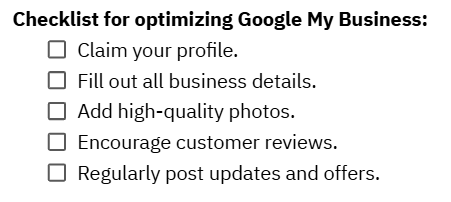
Chart showing local SEO ranking factors:
Step 7: Include schema markup
Clear, structured schema markup can help AI systems accurately pull and interpret the information, ensuring your content is used in responses.
In the context of GEO, entities refer to specific, well-defined objects, places, or concepts in your content that AI engines can identify and relate to other information. So, focus on making sure the entities in your content are clearly structured and linked to other relevant information.
For example, if you’re writing content for a local business, the primary entity could be the business itself. Still, it could also include related entities such as products, services, events, and even customer reviews. Here’s a simple example of how you could implement schema markup for a local bakery in Austin, Texas:
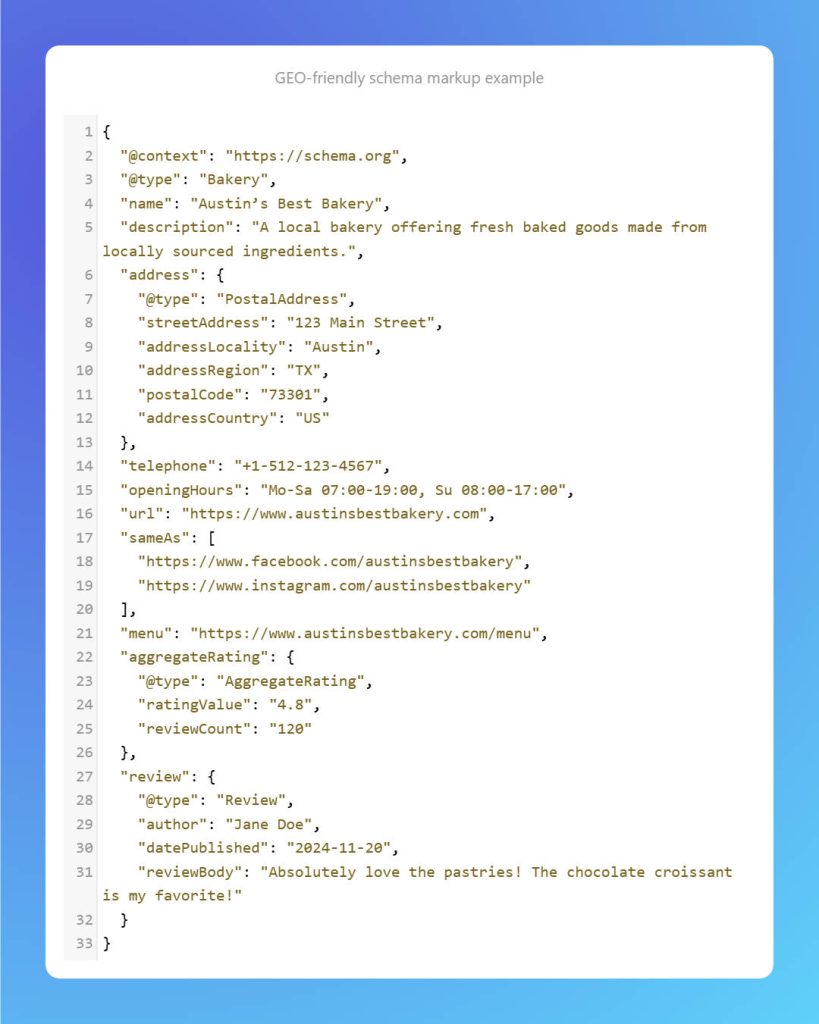
This schema markup highlights the Bakery as the primary entity, followed by related entities like the menu, reviews, and ratings. These entities help AI engines understand the full scope of the bakery’s offerings and improve the likelihood of the content being used in AI-driven search answers.
Step 8: Monitor and test GEO results
After publishing, use tools like SEMrush to monitor your GEO performance. While traditional SEO metrics like traffic and engagement still apply, GEO also involves ensuring your content appears in AI-driven responses. Here’s how to use SEMrush to track GEO success:
- Navigate to the Position Tracking tool.
- Add relevant conversational keywords or queries.
- Check how often your content appears for those queries in Google’s featured snippets, “People Also Ask”, or “AI overviews” sections by navigating to “Overview” and clicking on “SERP features.”
Here’s another idea: if you want to check how often AI tools like ChatGPT or Gemini mention your website in generated responses, open your GA4 report. Head to Life Cycle > Acquisition > Traffic Acquisition. Then, filter the results by session medium “Referral” and session source to see where your traffic is coming from.
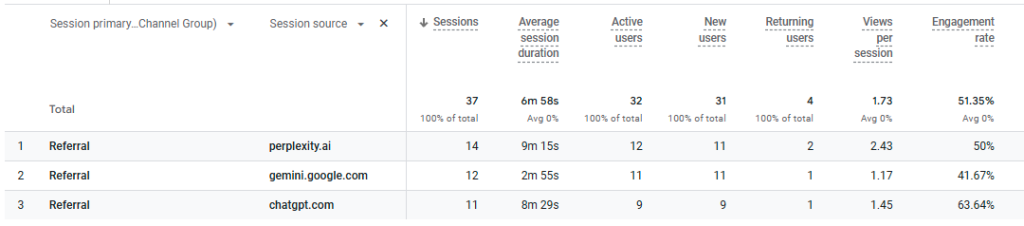
Final tip: test with AI tools. Input your queries into ChatGPT or Gemini and observe the responses. Does your content appear? If not, refine it to better address the query.
Step 9: Regularly update content
Generative engines value fresh, relevant information. Schedule regular updates to your GEO-friendly content to maintain its effectiveness. For example:
- add new data or examples,
- expand on popular questions,
- optimize headings and metadata.
If you wrote a blog post about “Top Local SEO Tools for 2023,” update it for 2024 with new tools or feature updates. Add insights about how tools like SEMrush integrate with AI systems to monitor local search performance.
Final thoughts
Creating content for GEO might feel like uncharted territory, but with the right approach, it becomes manageable. By focusing on natural language queries, clear structure, and rich context, you can ensure your content is ready for AI-driven engines. Start small by optimizing one blog post using this guide. Experiment, analyze, and adapt as you learn. With consistent effort, your content will shine in the world of generative AI!