When did you last search for something and click on an image result instead of a text link? Whether it was for a product, a recipe, or travel inspiration, images likely played a big role in your search experience. That’s where image SEO comes in. It helps ensure your visuals are seen and understood by search engines and users.
In this post, I’ll explain what image SEO is, how it connects to organic traffic, and what you could do to make your images more effective.
Table of Contents
What is image SEO?
Image SEO helps search engines make sense of your images, ensuring they understand and rank them appropriately. It involves refining details like filenames, metadata, and the context around your visuals. When done well, image SEO boosts the chances of your images appearing in search results and drawing in viewers.
Search engines don’t “see” images as we do. Instead, they rely on clues like the text near the image, its relevance to the rest of the page, and technical details like alt text. For example, a photo of a sunset next to a travel guide adds meaningful context that helps search engines categorize it. On top of that, advances in machine learning allow search engines to analyze patterns in visuals, improving how they match images with search queries.
Elements like structured data, captions, and metadata also influence how search engines interpret and display your visuals. For instance, structured data can highlight your images in search results, giving them a polished and professional edge. As these technologies become smarter, the way images are ranked and displayed continues to evolve.
Image SEO isn’t just about satisfying algorithms – it’s about creating content that genuinely resonates with your audience. Optimized images improve user engagement, enhance accessibility, and support your overall content strategy. If visuals are a big part of your message, prioritizing image SEO ensures they don’t go unnoticed.
Connecting image SEO to organic traffic
Well-optimized images can do more than enhance your website’s appearance; they can also be a driving force behind organic traffic. When your visuals are easier to find and faster to load, they naturally attract more clicks and keep users engaged.
Key ways image optimization drives organic traffic include:
- Increasing visibility in image search results and image packs.
- Enhancing user experience through faster page load speeds.
- Boosting engagement with visually appealing content.
- Improving accessibility for all users, including those using screen readers.
- Strengthening content marketing by complementing text with relevant visuals.
Each of these elements works together to make your content more appealing to both users and search engines. For instance, optimized images are more likely to appear in image search results or grouped in curated packs, making it easier for users to discover your content. Images with descriptive file names, detailed alt text, and relevant captions, such as “red-running-shoes.jpg” with alt text “Red running shoes for women, ideal for jogging,” align with search engine criteria and attract targeted visitors.
Page load speed is another crucial factor. Compressing image file sizes keeps your site snappy and responsive, which benefits both rankings and user satisfaction. Mobile users, in particular, appreciate a fast-loading site, and search engines reward this with better visibility.
Visually compelling content has the power to hold attention and encourage sharing. High-quality images not only make your site more attractive but can also drive additional traffic through social media and backlinks, giving your content a broader reach.
Accessibility should not be overlooked. Thoughtful alt text and captions allow users with disabilities to understand your visuals while giving search engines more context to rank them accurately.
Finally, images work best when they compliment your written content, making your pages more comprehensive and engaging. For example, a guide enhanced with step-by-step visuals or infographics creates a richer experience, keeping users on the page longer and encouraging them to explore further.
If you want a broader understanding of how organic traffic works, including image traffic, check out my blog post on different types of organic traffic.
Impact of image SEO on website accessibility and UX
Optimizing your images isn’t just about boosting your search rankings; it’s about making your site more welcoming and easier to use for everyone. When your visuals load quickly, convey clear meaning, and are accessible to all visitors, your website becomes a place people want to stay and explore.
Accessibility benefits
Not all visitors experience your website the same way. For visually impaired users, features like alt text are essential. Alt text provides a description of your images that screen readers can convey to those who cannot see them. A description like “A golden retriever catching a ball in the park” does far more than a vague label like “image1.jpg” – it creates context and connection.
Accessible navigation goes hand in hand with this. Descriptive labels and meaningful image names ensure assistive technologies can guide users smoothly through your site. This is not just about following guidelines like the Web Content Accessibility Guidelines (WCAG); it’s also about demonstrating that you value every visitor.
UX improvements
A seamless user experience starts with visuals that load quickly, align with your content, and work beautifully across devices. Key UX factors include:
- Faster load times: Compressing and resizing images reduces page delays, which keeps users engaged and lowers bounce rates. Mobile users especially appreciate pages that load in seconds, not minutes.
- Purposeful visuals: Images that support your content, such as step-by-step illustrations or product details, help users understand information faster and stay engaged longer.
- Responsive design for mobile: Optimized images scale properly and look sharp on every screen size, making navigation easier for mobile users.
Bringing it all together
When accessibility and user experience meet, your website becomes a destination that people want to explore. Well-optimized images don’t just add polish; they make your content more inclusive, engaging, and impactful. Search engines notice this, too, rewarding you with better rankings and visibility. Ultimately, the effort you put into image SEO is an investment in creating a site that’s welcoming, efficient, and memorable for all.
Different websites, different practices
Every website has unique needs, and image SEO should reflect that. Whether you run an online store, a news platform, or a blog, tailoring your image strategy helps you connect more effectively with your audience and create a better experience for your visitors.
E-commerce: turn browsers into buyers
High-quality product images aren’t just a nice-to-have – they influence purchasing decisions. A 2023 Nfinite survey revealed that:
- 65% of online shoppers are more likely to buy an item if they can see it from all angles;
- 83% of consumers would return a product if the online image doesn’t match the actual product.
Both of these findings highlight the importance of accurate product imagery.
To optimize product images for search and user experience:
- Showcase products from multiple angles or in close-up shots to highlight key features.
- Use descriptive file names like “blue-summer-dress-front.jpg” and include relevant details in the alt text, such as color or brand name.
- Compress images to maintain fast page speeds without losing quality. A smooth browsing experience keeps potential buyers on your site.
Practical example: For a summer dress listing, include lifestyle images showing the dress in real-life settings. Alt text like “Blue floral summer dress worn outdoors at a picnic” helps search engines and users alike.
News websites: inform and engage
Timely and relevant visuals grab readers’ attention and add depth to your stories. A Reuters Institute study revealed that articles with relevant visuals are 94% more likely to be read. For news sites:
- Pair compelling images with descriptive file names and alt text that reflect the article’s focus. For instance, “city-protests-2024.jpg” provides context immediately.
- Compress images to handle high traffic without slowing down load times.
- Use captions to summarize key details, giving readers quick insights while reinforcing the image’s relevance.
Research from the International Journal of Communication highlights that news stories accompanied by relevant visuals significantly boost reader engagement and comprehension.
Practical example: Covering a breaking news story about climate protests? A photo titled “climate-protest-crowd-2024.jpg” with alt text like “Crowd holding climate action signs during a protest in Washington, D.C.” ensures both clarity and search visibility.
SaaS platforms: make features clear
Screenshots are an effective way to showcase your product’s functionality, but they need careful optimization to perform well:
- Use screenshots of dashboards, workflows, or charts to highlight key features.
- Add annotations to guide viewers’ focus and clarify complex visuals.
- Write alt text that explains the purpose of the screenshot, not just what it shows.
Practical example: A project management tool might feature a dashboard screenshot labeled “project-management-dashboard.jpg,” with alt text like “Project management tool showing tasks, deadlines, and team collaboration features.”
Blogs: visuals that tell a story
For blogs, visuals should break up text and enhance your narrative. According to Forbes, web articles that contain images receive 94% more views than articles that don’t. To get it right:
- Place images near relevant sections of text to make your content more engaging and easier to follow.
- Use alt text that describes the image in plain language, avoiding overly technical search terms or keyword stuffing.
- Align visuals with your blog’s tone – fun and colorful for a travel blog, clean and professional for a business guide.
Practical example: Writing about picnic spots in Central Park? Include an image titled “central-park-picnic-spring.jpg” with alt text like “Families enjoying a spring picnic on the lawns of Central Park.”
Quick checklist for image optimization
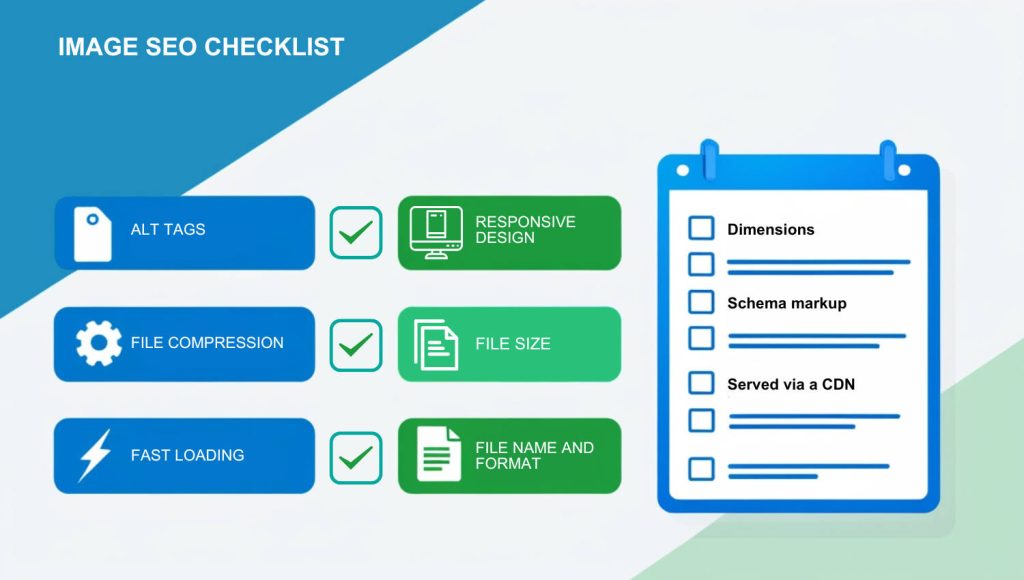
Want to make your images SEO-friendly? Use this checklist to optimize your visuals for search engines and user experience.
File preparation
- Keep image file sizes under 100KB whenever possible; aim for under 300KB for larger visuals.
- Choose the right format for the image:
- JPEG: Best for photos (small size, good quality). Keep quality above 80% to balance clarity and size.
- PNG: Ideal for graphics with transparency. Use PNG-8 instead of PNG-24 to reduce file size for simpler images.
- WebP: Modern browsers only – smaller size, high quality. Use WebP for modern browsers and JPEG/PNG for older ones.
- SVG: Use for logos, icons, and simple graphics.
File names and metadata
- Use descriptive, keyword-rich file names (e.g., “blue-summer-dress.jpg” instead of “IMG123.jpg”).
- Write clear, concise alt text that describes the image and includes keywords naturally; avoid keyword stuffing; skip unnecessary words like “and,” “or,” and “a.”
- Use hyphens (-) instead of spaces or underscores (_).
- Add helpful captions to provide context or value to the image; keep them clear and relevant to users.
Page load speed
- Compress images using tools like TinyPNG, ShortPixel, or ImageOptim to reduce size without losing quality.
- Resize images to fit their display size; don’t upload oversized visuals (e.g., avoid a 2000px-wide image for a 500px display).
- Enable lazy loading to prioritize loading visible images first.
- Avoid overcrowding the page with high-resolution images to maintain a fast loading speed.
Mobile and responsive design
- Use responsive image techniques (e.g., <picture> or srcset) to ensure images look great on all devices.
- Limit the maximum image width to 1200px for mobile compatibility.
Advanced optimization
- Use schema markup (e.g., ImageObject) for key visuals to enhance search visibility.
- Serve images via a Content Delivery Network (CDN) for faster global delivery.
- Set image width and height in HTML or CSS to avoid layout shifts during page load.
In summary
Effective image SEO blends technical precision with thoughtful design, making your website faster, more accessible, and engaging for every visitor. By applying even a few optimization practices, you can significantly improve how search engines and users interact with your content. Think of your images not just as visual elements but as tools to connect, inform, and enhance the experience for everyone who visits your site.